
POLYGON
CompleteChecked against Musa CAD 0.8.0Verified
Draw a regular polygon by centre or by one edge.
- Type
- POLYGON or POL
- On the ribbon
- Home › Draw › Rectangle › Polygon
- Home › Draw (slide-out) › Polygon
- Since
- Musa CAD 0.4.0
What it asks first
Command: POLYGONEnter number of sides <4>:Read from Musa CAD 0.8.0 itself (musacad --dump-wiki-data), so these facts always match the release this wiki is built for (0.8.0).
POLYGON draws a regular polygon: a shape whose sides are all the same length, such as a hexagon for a nut. The polygon is one closed polyline.
How it works
Section titled “How it works”Type POL and press Enter. Give the number of sides, then the centre. Next, choose whether the size you give reaches the corners (Inscribed) or the middle of the sides (Circumscribed). Then give that size.
Command: POLEnter number of sides <4>: 6Specify center of polygon or [Edge]: 0,0Enter an option [Inscribed in circle/Circumscribed about circle] <I>: EnterSpecify radius of circle: 20Polygon created.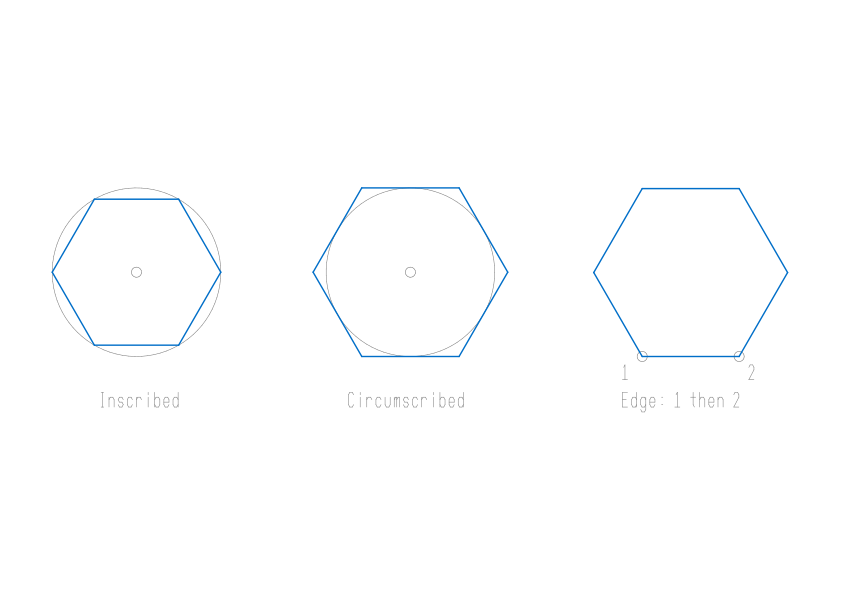
Options
Section titled “Options”| Option | What it does |
|---|---|
Edge (E) | Instead of the centre, give the two ends of one side: Specify first endpoint of edge: and Specify second endpoint of edge:. Looking from the first point to the second, the polygon is built on your left. Give the points from left to right to build it above the edge. |
Inscribed in circle (I) | The radius is the distance from the centre to each corner. The polygon fits inside a circle of that radius. |
Circumscribed about circle (C) | The radius is the distance from the centre to the middle of each side. The polygon fits around a circle of that radius. For a hexagon 20 across its flats, type a radius of 10. |
| Enter at Enter number of sides | Keeps the number shown, which is the last one you used. |
Typing or clicking the radius
Section titled “Typing or clicking the radius”- If you type the radius, the polygon stands on a flat bottom edge.
- If you click a point, the point sets both the size and the turn. With Inscribed, a corner lands on the point. With Circumscribed, the middle of a side does.
Good to know
Section titled “Good to know”- A polygon can have 3 to 1024 sides. Any other number is refused with
Requires an integer between 3 and 1024. - The number of sides and your Inscribed or Circumscribed choice are kept until you close Musa CAD. Pressing Enter at the Inscribed or Circumscribed question keeps your last choice, but the prompt always shows
<I>. TypeIorCwhen you want to be sure. - A radius of 0 or less is refused with
The radius must be greater than zero.Two edge ends at the same place are refused withThe two edge endpoints must differ. - The result is a closed polyline. To work on its sides as separate lines, use EXPLODE.
- Esc cancels the command. Nothing is drawn.
Compared with AutoCAD
Section titled “Compared with AutoCAD”POLYGON follows AutoCAD’s two ways of sizing a polygon: about a centre, Inscribed or Circumscribed, or by one edge. As in AutoCAD, a typed radius stands it on a flat bottom edge.