
Drawings from code
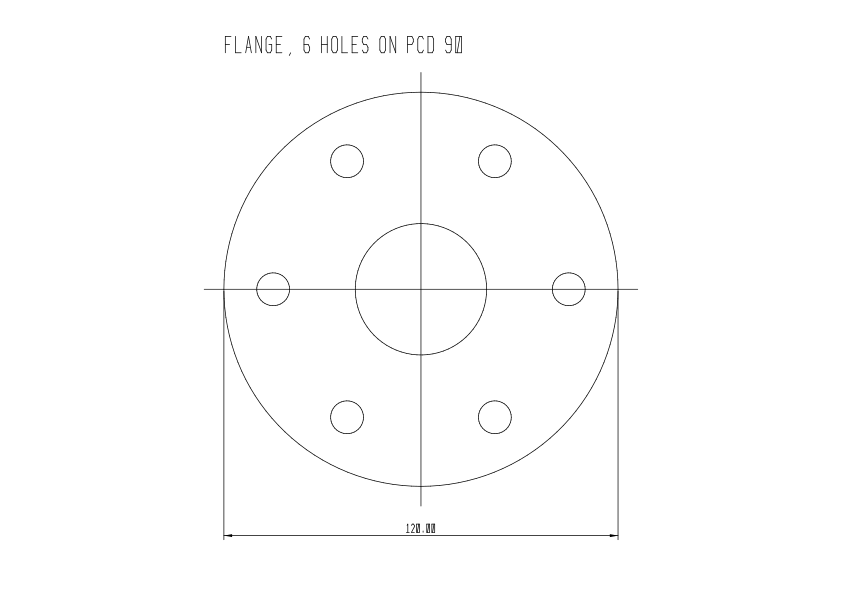
A Musa CAD drawing is a plain text file. That means any program can write one: a Python script, a spreadsheet macro, a web service, or an AI agent. This page walks through a short Python program that draws a flange. Change a number at the top, run it again, and you get a new drawing.
The program
Section titled “The program”The code below is the exact program that made the drawing above. When the wiki is built, it runs this program, then asks Musa CAD to print the result. If either step fails, the wiki does not build.
#!/usr/bin/env python3# SPDX-License-Identifier: LGPL-3.0-or-later# Copyright (C) 2026 Pranay Kiran# This example is also yours under CC0: copy it into your own work without credit."""Write a flange drawing as a Musa CAD .musa file.
    python3 flange.py flange.musa
Change the numbers below and run it again: the drawing follows. Then check it and printit to PDF with Musa CAD:
    musacad --check flange.musa    musacad --plot flange.musa flange.pdf --paper A4 --landscape"""import mathimport sys
# The part, in millimetres.OUTER_DIAMETER = 120.0BORE_DIAMETER = 40.0BOLT_CIRCLE_DIAMETER = 90.0BOLT_HOLE_DIAMETER = 10.0BOLT_COUNT = 6
# Every object ends with the same seven properties: layer 0, colour, linetype and# lineweight from the layer (ByLayer).BY_LAYER = "0 7 255 255 255 0 25"

def line(x0, y0, x1, y1):    return f"LINE {x0:g} {y0:g} {x1:g} {y1:g} {BY_LAYER}"

def circle(cx, cy, r):    return f"CIRCLE {cx:g} {cy:g} {r:g} {BY_LAYER}"

def text(x, y, height, content):    # A text is three lines: the record, the words, and the font (empty: the built-in font).    return f"TEXT {x:g} {y:g} {height:g} 0 0 {BY_LAYER}\n{content}\n"

def linear_dimension(x0, y0, x1, y1, line_x, line_y):    # Kind 0 is a linear dimension. Musa CAD measures it from the two points.    return f"DIM 0 {x0:g} {y0:g} {x1:g} {y1:g} {line_x:g} {line_y:g} 0 {BY_LAYER}"

def drawing():    records = [        "MUSACAD 14",  # the format version this file is written in        "UNITS mm",        "CURRENT 0",        "LTSCALE 1",        "LAYER 255 255 255 0 25 1 0 0 0",  # layer 0: white, continuous, 0.25 mm, on        "DIMSTYLE 2.5 2.5 0 0.6 1.25 2 1 25 1 0 0 0 1 0 0 0 1 0 0 0 1 0 0 0 Standard",    ]    r_out = OUTER_DIAMETER / 2    records.append(circle(0, 0, r_out))    records.append(circle(0, 0, BORE_DIAMETER / 2))    for i in range(BOLT_COUNT):        a = 2 * math.pi * i / BOLT_COUNT        r = BOLT_CIRCLE_DIAMETER / 2        records.append(circle(r * math.cos(a), r * math.sin(a), BOLT_HOLE_DIAMETER / 2))    # Centre lines, a little longer than the part.    ext = r_out + 6    records.append(line(-ext, 0, ext, 0))    records.append(line(0, -ext, 0, ext))    # The overall width, measured across the outer circle.    records.append(linear_dimension(-r_out, 0, r_out, 0, 0, -r_out - 15))    records.append(text(-r_out, r_out + 12, 5, f"FLANGE, {BOLT_COUNT} HOLES ON PCD {BOLT_CIRCLE_DIAMETER:g}"))    records.append("END")    return "\n".join(records) + "\n"

if __name__ == "__main__":    out = sys.argv[1] if len(sys.argv) > 1 else "flange.musa"    with open(out, "w", encoding="utf-8") as f:        f.write(drawing())    print(f"wrote {out}")
Run it, then check and print the result:
python3 flange.py flange.musamusacad --check flange.musamusacad --plot flange.musa flange.pdf --paper A4 --landscapeWhat it writes
Section titled “What it writes”This is the file the program produces:
MUSACAD 14UNITS mmCURRENT 0LTSCALE 1LAYER 255 255 255 0 25 1 0 0 0DIMSTYLE 2.5 2.5 0 0.6 1.25 2 1 25 1 0 0 0 1 0 0 0 1 0 0 0 1 0 0 0 StandardCIRCLE 0 0 60 0 7 255 255 255 0 25CIRCLE 0 0 20 0 7 255 255 255 0 25CIRCLE 45 0 5 0 7 255 255 255 0 25CIRCLE 22.5 38.9711 5 0 7 255 255 255 0 25CIRCLE -22.5 38.9711 5 0 7 255 255 255 0 25CIRCLE -45 5.51091e-15 5 0 7 255 255 255 0 25CIRCLE -22.5 -38.9711 5 0 7 255 255 255 0 25CIRCLE 22.5 -38.9711 5 0 7 255 255 255 0 25LINE -66 0 66 0 0 7 255 255 255 0 25LINE 0 -66 0 66 0 7 255 255 255 0 25DIM 0 -60 0 60 0 0 -75 0 0 7 255 255 255 0 25TEXT -60 72 5 0 0 0 7 255 255 255 0 25FLANGE, 6 HOLES ON PCD 90
END
A few rules are worth knowing before you write your own:
- The first line names the format version, here
MUSACAD 14, and the last line isEND. Musa CAD reads every older version, so a file written as version 14 opens in every release since 0.1.0. A newer release only refuses files that are newer than itself. - One object per line. The numbers come first (
LINE x0 y0 x1 y1,CIRCLE cx cy r), followed by seven numbers for the object’s properties: layer, which properties come from the layer, colour, linetype and lineweight.0 7 255 255 255 0 25means layer 0, with colour, linetype and lineweight taken from the layer. - Text takes three lines: the record, the words, then the font (an empty line means the built-in font).
- Dimensions are measured, not typed. A
DIMrecord gives the points it measures and where its line goes; Musa CAD works out the number. You cannot make a dimension show a wrong value by accident. - The reader is strict. A line with the wrong number of values stops the whole file, and
musacad --checktells you which line it was. That is a feature: a broken drawing never opens half-right. - Units are what you decide. The file says
UNITS mm; one unit is then one millimetre, and dimensions read in millimetres.
The .musa format page has the version history. For the full list of record types, the definitive reference is Musa CAD’s own reader, native_format.cpp. A complete, tested Python writer that covers text, dimensions, leaders, hatches, blocks and title blocks is part of the fabrication pipeline.
Write DXF instead
Section titled “Write DXF instead”If your tool already writes DXF, Musa CAD reads it directly. Both --check and --plot accept a .dxf file. The file name’s ending decides how it is read.
- Parts from a spreadsheet: one row per part, one drawing per row, printed to PDF in one go.
- Drawings that follow the design: regenerate the drawing whenever the numbers change, and check it in your build.
- A drawing for every order: fill in a title block and a bill of materials from your order system.
- Let an AI agent draft it: see AI workflows.