
ELLIPSE
Draw an ellipse or an elliptical arc.
- Type
- ELLIPSE or EL
- On the ribbon
- Home › Draw › Ellipse
- Home › Draw › Ellipse › Center
- Home › Draw › Ellipse › Axis, End
- Home › Draw › Ellipse › Elliptical Arc
- Since
- Musa CAD 0.4.0
What it asks first
Command: ELLIPSESpecify axis endpoint of ellipse or [Arc/Center]:Read from Musa CAD 0.8.0 itself (musacad --dump-wiki-data), so these facts always match the release this wiki is built for (0.8.0).
ELLIPSE draws an ellipse, the oval shape a circle makes when you look at it at an angle. It can also draw part of one, called an elliptical arc. An ellipse has two axes: the long one through its widest part, and the short one across it.
How it works
Section titled “How it works”Type EL and press Enter. Give both ends of one axis. Then give the distance from the centre out to the edge along the other axis. Musa CAD draws the ellipse and the command ends.
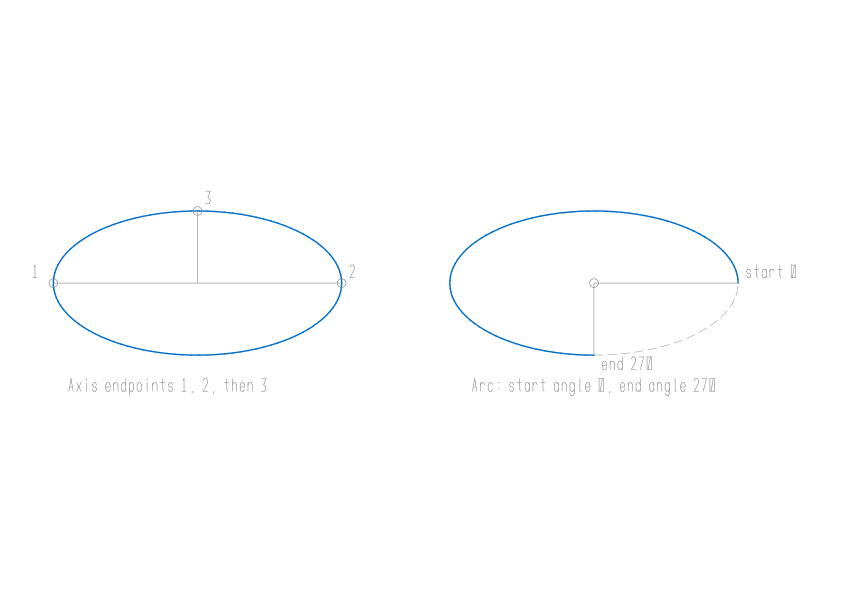
Command: ELSpecify axis endpoint of ellipse or [Arc/Center]: 0,0Specify other endpoint of axis: @80,0Specify distance to other axis or [Rotation]: 20The distance is half the other axis. This ellipse is 80 long and 40 tall.
Options
Section titled “Options”| Option | What it does |
|---|---|
Center (C) | Give the centre first: Specify center of ellipse:. Then Specify endpoint of axis:, one end of the first axis, and the distance to the other axis. |
Arc (A) | Draws an elliptical arc. You give the ellipse in the same way, then a start and an end angle. See Elliptical arcs. |
Rotation (R) | Instead of the other axis: Specify rotation around major axis:. Think of a circle as wide as the first axis, turned away from you by that angle. 0 gives a circle, and 60 makes the other axis half as long. The angle must be less than 89.4 degrees. |
Isocircle (I) | Appears only while isometric drafting is on (see ISODRAFT). Draws a circle as it looks in the current isometric plane. Give the centre, then the radius or Diameter. |
Elliptical arcs
Section titled “Elliptical arcs”Type A first. After the axes, Musa CAD asks for the start and end angles:
Command: ELSpecify axis endpoint of ellipse or [Arc/Center]: ASpecify axis endpoint of elliptical arc or [Center]: CSpecify center of elliptical arc: 150,0Specify endpoint of axis: @40,0Specify distance to other axis or [Rotation]: 20Specify start angle or [Parameter]: 0Specify end angle or [Parameter/Included angle]: 270Angles are in degrees, measured counter-clockwise from the first axis you gave. The arc runs counter-clockwise from the start angle to the end angle. You can also click a point: its direction from the centre gives the angle.
| Option | What it does |
|---|---|
Parameter (P) | Give the ellipse’s parameter instead of a true angle. The parameter is the angle on the circle the ellipse is squashed from, which differs from the true angle except along the axes. |
Angle (A) | Goes back to true angles. |
Included angle (I) | At the end prompt, give how far the arc sweeps from its start instead: Specify included angle for arc <180>:. |
Good to know
Section titled “Good to know”- The longer axis always becomes the major axis, whichever one you gave first. Angles for an arc are still measured from the first axis you gave.
- An axis with no length is refused with
Invalid axis length. - Rotation of 89.4 degrees or more is refused with
Rotation must be less than 89.4 degrees. - Isocircle while isometric drafting is off says
Isocircle needs isometric drafting: ISODRAFT, or SNAP Style Isometric. - An included angle of 0 is refused with
Included angle must be non-zero. - When PELLIPSE is 1, ELLIPSE draws a polyline made of arcs that follows the ellipse, instead of a true ellipse.
- Esc cancels the command. Nothing is drawn.
Compared with AutoCAD
Section titled “Compared with AutoCAD”ELLIPSE follows AutoCAD’s prompts. As in AutoCAD, the longer axis is stored as the major one, Rotation accepts angles below 89.4 degrees, and Isocircle is offered while isometric drafting is on.