
DIMDIAMETER
Create a diameter dimension for a circle or arc.
- Type
- DIMDIAMETER or DDI
- On the ribbon
- Home › Annotation › Linear › Diameter
- Annotate › Dimensions › Linear › Diameter
- Since
- Musa CAD 0.1.0
What it asks first
Command: DIMDIAMETERSelect arc or circle:Read from Musa CAD 0.8.0 itself (musacad --dump-wiki-data), so these facts always match the release this wiki is built for (0.8.0).
DIMDIAMETER dimensions the diameter of a circle or an arc: its full width through the centre. The value is shown with the diameter sign in front, such as ⌀40.00.
How it works
Section titled “How it works”Type DDI and press Enter. Pick the circle or arc anywhere on it. Then move the cursor and click where the text should go. The dimension runs through the centre towards the place you click. The dimension is drawn and the command ends.
Click outside the curve to put the text outside, on a short leader with one arrow touching the curve. Click inside to draw the dimension line right across, with an arrow at each side and the text on the line.
Command: DDISelect arc or circle: (pick the circle)Specify dimension line location or [Mtext/Text/Angle]: (click up and to the right, outside the circle)Dimension placed.Dimension created from object.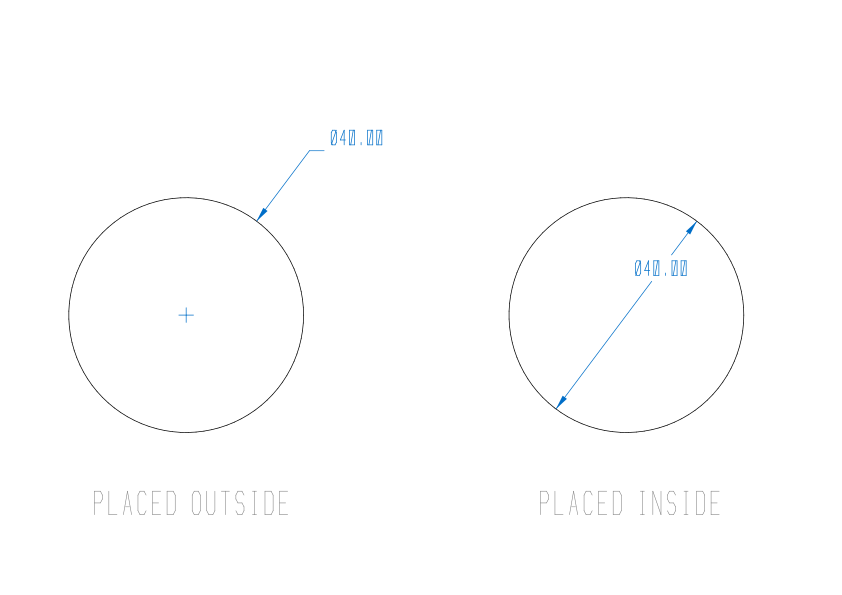
Options
Section titled “Options”These options are offered while you place the dimension. After you choose one, Musa CAD asks for the dimension line location again.
| Option | What it does |
|---|---|
Mtext (M) or Text (T) | Type your own text at Enter dimension text (<> for the measurement):. <> stands for the measured value, so 4 HOLES <> reads 4 HOLES ⌀40.00. Text without <> replaces the value. Press Enter without typing to use the measurement. |
Angle (A) | Turns the text. At Specify angle of dimension text: type an angle in degrees. 0 or Enter puts it back the normal way. |
Good to know
Section titled “Good to know”- You can pick a circle, an arc, or a curved segment of a polyline.
- The value comes from the curve itself: twice its radius, wherever you picked it.
- Musa CAD checks what you picked as you place the dimension. If there was no circle or arc under the pick, it says
Could not dimension that object -- select a line, circle, or arc.and draws nothing. - To type the diameter sign in your own text, use
%%c. - The sign and the number of decimal places come from the current dimension style. A Prefix set in DIMSTYLE takes the place of the sign.
- Esc cancels without drawing anything. U removes the dimension in one step.
Compared with AutoCAD
Section titled “Compared with AutoCAD”DIMDIAMETER uses the same prompts and options AutoCAD users know.