
DIMCONTINUE
Continue a dimension chain from the last dimension's second extension line.
- Type
- DIMCONTINUE or DCO
- On the ribbon
- Home › Annotation (slide-out) › Continue
- Annotate › Dimensions › Continue
- Since
- Musa CAD 0.3.0
What it asks first
Command: DIMCONTINUESpecify a second extension line origin or [Select/Undo] <Select>:Read from Musa CAD 0.8.0 itself (musacad --dump-wiki-data), so these facts always match the release this wiki is built for (0.8.0).
DIMCONTINUE adds dimensions end to end, in a chain. Each new dimension starts at the second extension line of the one before and sits on the same dimension line. It is the quick way to dimension a row of steps or holes, one after another.
How it works
Section titled “How it works”First draw one dimension, for example with DIMLINEAR. Then type DCO and press Enter. Click the next point you want to dimension to. A new dimension is added from the end of the last one to that point. Keep clicking: each new dimension carries on from the one you just added.
To finish, press Enter twice, or press Esc. The first Enter asks which dimension to continue from; the second one ends the command.
Command: DCOSpecify a second extension line origin or [Select/Undo] <Select>: 70,35Continued dimension added.Specify a second extension line origin or [Select/Undo] <Select>: 100,20Continued dimension added.Specify a second extension line origin or [Select/Undo] <Select>: EnterSelect continued dimension: Enter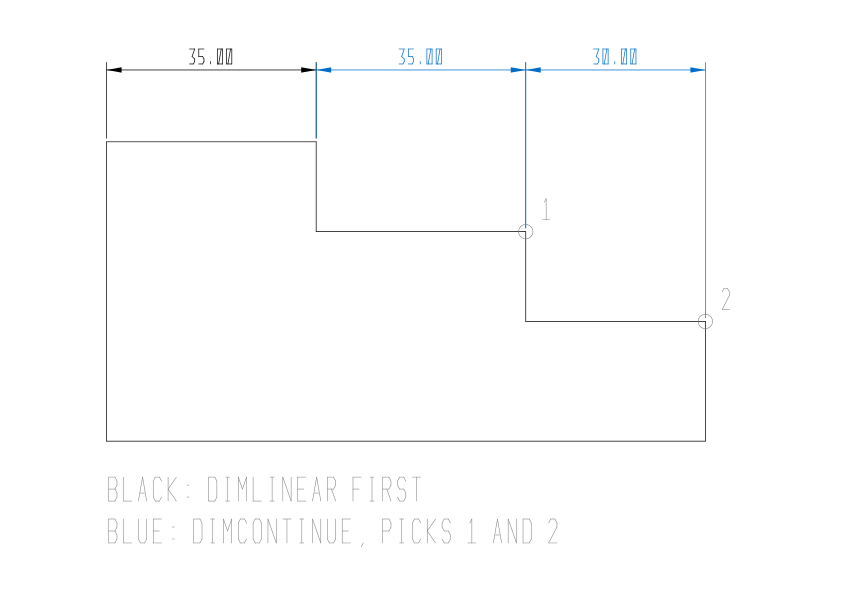
Continue from a different dimension
Section titled “Continue from a different dimension”DIMCONTINUE starts from the last dimension drawn. To go on from another one, press Enter (or type S) at the first prompt. At Select continued dimension: click the dimension, near the extension line you want to continue from. Then click the next points as before.
Command: DCOSpecify a second extension line origin or [Select/Undo] <Select>: EnterSelect continued dimension: (click the dimension near its right-hand extension line)Specify a second extension line origin or [Select/Undo] <Select>: (click the next point)Continued dimension added.Options
Section titled “Options”| Option | What it does |
|---|---|
Select (S) | Asks Select continued dimension:, so you can continue from a dimension you pick. Enter does the same. Pressing Enter at Select continued dimension ends the command. |
Undo (U) | Removes the last dimension added and goes back to the one before it, so the next pick continues from there. With nothing added yet in this run, Musa CAD says Nothing to undo. |
Good to know
Section titled “Good to know”- You can continue from a linear, aligned, angular or ordinate dimension. An angular chain goes round the same vertex, on the same arc. An ordinate chain adds the next feature measured from the same datum.
- A linear chain keeps the first dimension’s direction. A horizontal row stays horizontal even when the points step up and down, as in the picture.
- Each new dimension takes the style, the overrides, the layer and the colour of the one it continues from. If DIMLAYER names a layer, the new ones go on that layer instead.
- If the drawing has no dimension yet, a pick says
DIMCONTINUE: no previous dimension to continue from; select a dimension. - If the last dimension is one that cannot be chained, such as a radius, a pick says
DIMCONTINUE needs a linear, aligned, ordinate or angular dimension to continue from. - At Select continued dimension, a pick on empty space says
No dimension found.A pick on a dimension of the wrong kind saysThe dimension selected is not a linear, aligned, ordinate or angular dimension. - Each dimension added is its own undo step, both with Undo inside the command and with U afterwards.
Compared with AutoCAD
Section titled “Compared with AutoCAD”DIMCONTINUE asks the same questions as AutoCAD’s, and Enter at Select continued dimension ends it, as in AutoCAD.
- Stack dimensions from one base line instead with DIMBASELINE.
- Dimension a whole row in one go with QDIM.
- Even out the gaps between rows of dimensions with DIMSPACE.